At a glance
Problem
UPS teams worldwide depend on this system to find, check and fix shipment documents. After 17 years it was slow, outdated and hard to search, so people had built workarounds around it.
My role
Design Lead for a team of three designers. I planned and ran the research, set the design direction, shaped the key decisions with UPS stakeholders and product owners, and documented each decision for teams across time zones.
Constraints
A 17-year-old system that couldn’t stop working, little documentation, users in 177 countries and many time zones, tight timelines, and every change reviewed through UPS approvals.
Approach
Four weeks of research before any design: a survey of 3,427 users (4 groups, 8 countries), sessions watching people do their real work, and usability tests. Then targeted fixes, each tied to a problem we found.
Outcome
Launched to all users. Usability rose from 39% to 62% in testing. Everyday workarounds moved into the product, admins gained control over access, and the new design language became the standard for UPS’s modernisation programme.
The biggest shift
From exporting images to Paint to fix them, to editing them safely inside the system. The image viewer is where most users spend their day.
Three decisions that mattered most
The changes that removed the most daily work and risk. Each links to the full story.
An image viewer built around real work
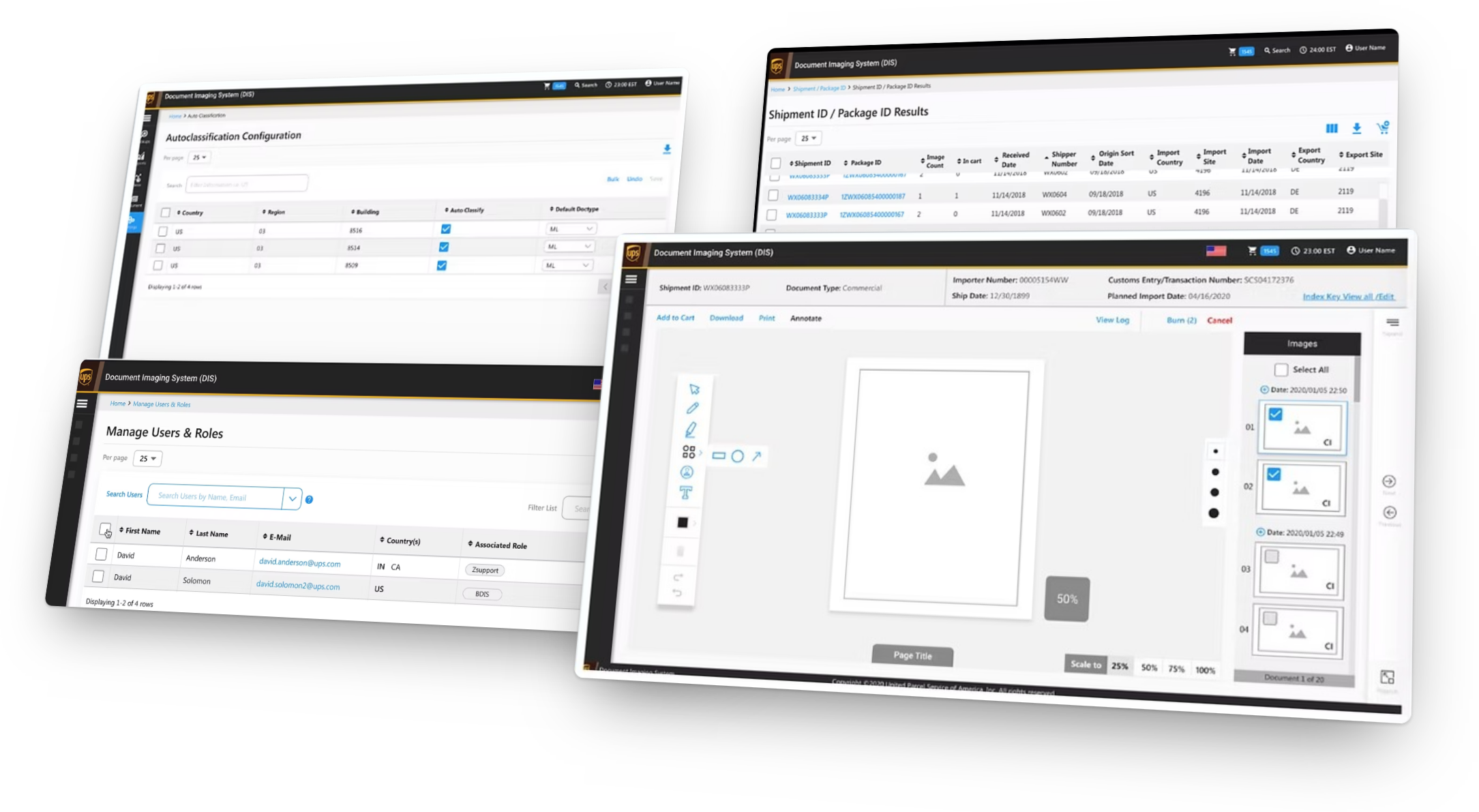
A survey answer revealed people were editing documents in Paint. We built scaling, blurring and annotation into the viewer, so documents stay in the secure system.
How we did itEvery report, taken apart and rebuilt
Nearly 40 reports, many unused, and the lowest survey score (Discovery, 3.07/10). We audited each one field by field, merged duplicates and retired the rest.
How we did itControl handed back to UPS
Access changes for ~30,000 users went through support tickets. We built self-serve user and role management with single sign-on, bulk actions and an activity log.
How we did itImpact
Launched to all users, with usability up by more than half in testing.
“Kiran is an exceptional UX talent who truly seeks to understand every aspect of the user base. As a member of our vendor’s team tasked with updating an outdated internal business system, he was able to understand the complicated, and sometimes poorly expressed, concerns of our users and develop streamlined solutions. He is a joy to work with and makes any project easier.”
Zach Rellstab, Package Process Management, UPSBillin: a cloud point-of-sale SaaS for small retailers
Read case studyThe opportunity
A mission-critical system had outgrown the business it was built to serve.
UPS operates in more than 220 countries and delivers over 21 million packages on an average day. Conduent has partnered with UPS for nearly two decades on business-critical applications, and in 2019 I joined the UPS Modernisation programme as design lead.
Top of the list was the document imaging system: where teams view and check every document image uploaded for UPS packages and deliveries, along with its data. They use it to track shipments and solve problems all the way down the line.
It was built 17 years earlier for the needs of its time. Since then the business had grown, and the system hadn’t kept up. Reliability and performance suffered at peak, the technology was ageing, and usability problems were piling up.
Where it was
Where it needed to be
How might we make the system fast, modern and functional without disrupting the thousands of people who rely on it every day?
My role
Design Lead for a team of three, accountable from strategy to delivery.
I led design for the rebuild with a team of three designers. Together with UPS stakeholders, product owners, managers and the scrum teams, we planned, researched, set the scope and delivered. My job was to keep every business and user need inside what the technology and timeline allowed.
Strategy and vision
Prioritised what to migrate and when, and set a design approach we could measure, so we delivered value sooner and avoided rework.
Uncovering insights
Started the research and ran workshops with users, stakeholders and managers to shape the first design concepts.
Execution and validation
Produced user flows, wireframes, mock-ups, prototypes and specs with the team, and directed measurement to keep the work aligned with modernisation goals.
Oversight and coordination
Kept teams aligned by documenting design decisions and the reasons behind them, so they held across time zones.
Research
Before designing anything, we spent four weeks learning how the system was really used, from thousands of users.
Modernising a legacy application starts with a thorough audit: learn the business use cases, then weigh the risks, hidden problems and opportunities. Everything learned becomes a new requirement, agreed through rounds of collaboration with stakeholders and users.
Aligning the teams first
To estimate timelines and scope, I set up knowledge-sharing sessions with the in-house project managers and analysts, then audited the current application with the UPS business team. What we learned:
- Little was documented. Even the team that built it had limited information about the full picture.
- Gaps in understanding: how the application was used, what some reports were for, data fields (index keys) nobody needed, and hidden problems.
- Many user types: usage spread across user hierarchies, countries and groups.
- UPS agreed to contextual inquiry, watching people do their real work, so we could study pain points from technical and non-technical angles.
- A four-week research plan was presented, with its expected results.
UPS is a large organisation solving complex problems, and its internal applications are data-heavy.
Three methods, chosen for time, scope and budget
Workflow and usability questions, worded to get honest, specific answers.
Watching hand-picked users from the survey do their real work, then interviewing them.
A/B tests comparing existing flows with new ideas.
3,427 voices, eight countries
Time zones made live sessions hard, so we ran a large-scale survey with both open questions and ratings, based on what our cross-functional teams had raised. We scored the experience on six measures.
How users rated the legacy system
Average score out of 10 · 3,427 users · 4 user groups · 8 countries · 2019
Discovery scored lowest, and most tasks depend on searching for information. For “Need to improve”, a higher score means users saw more room for improvement.
What the survey asked
- Problems that impact your work or other areas of your work?
- What does your typical work day look like?
- What features do you like about the current system?
- Anything surprising or unexpected about the current system?
- Do you have alternative apps that help you accomplish similar tasks?
- Any workarounds to help with the tasks above?
- How long have you been using the system?
- The most difficult task you perform, and what makes it difficult?
Hypotheses from the data
- A clear signal that improvement was needed.
- Usefulness got a passing score: the system did its job reasonably well, even within its constraints.
- Most of the application revolves around searching and discovering information, so it was no surprise that discovery took the biggest hit.
- Users described a lack of visibility when issues happen, which leads to errors in the workflow.
Watching people work
Internal users have a real advantage as research participants: they know their workflows in depth and can be precise about what’s hard. We asked them to describe and demonstrate daily tasks and search patterns, and to show us the frustrations, red flags and workarounds they relied on.
Our goal was to dig into features, sub-features and the small details, covering users from every group and location within a tight time frame.
“There is a lack of visibility when an issue is going on, and that causes errors in the workflow.”
Admin user- We finished the early-stage research on schedule.
- Our biggest challenge was domain knowledge. The gap between complexity and possibility was wide, and the users closed it for us.
- Talking to users showed us how chaotic the day-to-day experience really was.
From too much data to clear priorities
The data was abundant: new functionality requests, facelifts, technology updates behind the scenes. With an internal focus group from different disciplines, I ran brainstorming sessions to make sense of it. Doing everything would have sunk the timeline, so we trimmed and prioritised the scope with one rule:
Examples from the priority list
- Users had uploaded images but couldn’t see them in the system for around three hours.
- “The current UI is usable but more time-intensive.”
- The ability to upload images through the web.
- Knowing who uploaded which documents.
- Contact details were invalid and out of date.
- Reports should show each user’s local time.
- Keyboard navigation through the options.
- No visible timestamp for image uploads.
What we found
Five problems, each costing people time every day.
Reports with no clear purpose
Nearly 40 reports, and many were unused or couldn’t justify their place.
Results that didn’t match the question
Queries returned results unrelated to the user’s intent, or null and invalid data, which left people guessing.
Missing features, rising manual work
Nearly 30,000 users in seven groups across 177 countries, yet changes to users and access went through manual back-end requests.
Poor prioritisation hurting performance
Even basics like marking required fields were missing, and core tools like the image viewer had been overlooked.
Inflexible functionality
Workflows couldn’t adapt to how different groups actually worked, which slowed everyone down.
The limitations were real, and so were the opportunities. Both sat side by side.
How we solved it
Five decisions I led hands-on, out of many in the rebuild, ordered by impact: how much daily work and risk each one removed. Each shows the evidence, the trade-off and the result.
- 01An image viewer for real work
- 02Every report rebuilt
- 03Self-serve user control
- 04A programme-wide design language
- 05Documentation across time zones
01 · An image viewer built around real work
Most users spend their day auditing document images. The tool they used for it had been overlooked for years.
The problem
The viewer connects to every report in the system, yet:
- a fix to an uploaded image could take days to show up, and new uploads didn’t appear for about three hours;
- moving between images was slow and tedious;
- there was no toolset, no filters by upload time, date or source, and no annotation.
Then one survey question, which other tools do you use, got an unexpected answer from a handful of people: Paint. They were exporting document images to scale, rotate and blur sensitive details: a slow workaround that moved documents outside a secure system.
What I did
- Mapped a new user flow around what auditors actually do, with the viewer at the centre.
- Gave the image the maximum screen space, and moved tools into a floating toolbox.
- Built in the Paint tasks: scale, rotate, blur and annotate, plus notes and filters by date and source.
- A/B-tested interface variants, iterated on feedback, and kept improving it after release.
The trade-off
I first proposed a bigger change. The team argued it would add a real learning load for thousands of daily users, and they were right. We redesigned it more carefully: new capability, familiar ground.
Result: image editing stays inside the system. The Paint workaround, and the security risk that came with it, disappeared. In UAT, one beta user summed it up: “really like it overall, and excited to see the new image viewer.”
02 · Every report, taken apart and rebuilt
Search and reporting are the core of the system, and they had the lowest score in the survey.
The problem
Nearly 40 reports, many unused, some built for specific locations or groups yet visible to everyone. Queries returned null, invalid or unrelated data. Discovery scored 3.07 out of 10, the lowest of all six measures. In one session a frustrated user questioned reports that even we couldn’t explain, and it kept happening.
What I did
- Broke every report down to each data field (index key) in a spreadsheet, column by column.
- Reviewed the purpose of each one with subject-matter experts and stakeholders: who uses it, for what decision.
- Merged near-duplicates, retired what nobody used, and reshaped each results grid around the context of its search.
- Took cues from other products and hand-picked elements that fit each flow.
The trade-off
It was slow, tedious work with little to show visually. But it was the only route to understanding why each report existed, and it kept us from carrying 17 years of clutter into a shiny new interface.
The objective was to cut the clutter and make every report work for the intent of the user and the business.
Result: fewer, clearer reports whose results match the question. The changes were often invisible, and they changed how skilfully people could use reports every day.
03 · Control handed back to UPS
Nearly 30,000 users in seven groups across 177 countries, and no screen to manage any of them.
The problem
To change a user’s details or access, an authorised person raised a ticket with the support team, who looked the user up by ID, with no tracking. UPS had little control over its own system, and every manual change was a chance for a security mistake.
What I did
- Single sign-on through Azure Active Directory: one set of credentials across UPS apps.
- An admin view of every user, with bulk actions.
- Roles, countries, buildings and regions managed together, not one field at a time.
- Pull, sort and filter users from different paths, then change roles for a whole group at once.
- Split into sub-modules that work together or independently.
The trade-off
It wasn’t in the original scope, and it widened our delivery plan. But the ticket dependency touched every part of the application and left room for security mistakes. It was a control problem, not a UI gap, so we built it anyway.
Result: UPS admins manage access themselves, in bulk, with an activity log. No tickets, no waiting. The goal was more control and flexibility for UPS, and that is what shipped.
04 · A design language for the whole modernisation programme
The interface was the first thing users complained about, and the hardest thing to change: every internal UPS app followed the same brand guidelines.
The problem
Users were blunt: “Personally, I feel the website is outdated; it’s ’90s style.” In the survey, ease of use scored 3.47 out of 10. A 17-year-old interface was slowing people down before they even reached the data.
What I did
- Pitched a new visual direction to UPS, rather than reskinning the old one.
- Created the language with UPS’s internal design team, the owners of the enterprise style guides, specifically for the modernisation programme.
- Defined it as a full system, not just a look: fonts, colours and themes, buttons and communication, containers and wizards, data tables with sorting, filtering and editing, and the grid.
- Applied it across every rebuilt screen.
The trade-off
I expected UPS to say no, because a new look touched every internal app, not just ours. Building it with the people who own the guidelines turned a likely rejection into shared ownership.
Result: the guidelines became the standard for UPS’s modernisation programme, so every rebuilt legacy app looks and behaves consistently.
05 · Documentation that kept every team aligned
Design decisions travelled through many non-design teams across time zones. Misreading one detail could undo weeks of work.
The problem
Our teams spanned locations and time zones. Engineers, analysts and product owners each needed to understand not only how to build a feature, but why it existed. Without that, complex details would drift between handoffs.
What I did
- Documented the design journey incrementally, alongside product owners, as features took shape.
- Gave every feature the same structure: version history, brief, who it’s for, journey flows, annotated mocks, final mockups, an interactive prototype and feedback notes.
- Captured the reasoning, use cases and insights from both business and user perspectives.
The trade-off
Writing as we designed took time out of every sprint. The aim was to remove uncertainty and give every team a clean handoff, including the half of the team picking it up overnight.
What each design document included
- Version updates to track iterations
- Feature brief: background, purpose and system context
- Who it’s for: role specifications and target users
- Journey flows: screens, steps and roadblocks
- Annotated mocks covering every component, behaviour and micro-detail
- Final mockups and specs for front-end developers
- Interactive prototype of the full experience
- Iteration and feedback notes
Result: clear handoffs across time zones, and documentation that later became the foundation for the full business requirements.
Beyond these five
These are the decisions I was most hands-on with. The rebuild covered far more: search forms, results, configuration and admin tools across the whole system, each designed in the new language and shaped through contextual inquiry and iteration with stakeholders.
Other findings from research we scored and sequenced (Now / Soon):
- Upload images via the web
- See who uploaded each document
- Upload timestamps on every image
- Reports in each user’s local time
- Paste many shipment IDs at once
- Keyboard navigation
- Global search
- Valid, current contact details
Impact
Launched to all users, with usability up by more than half in testing.
What beta users said in user acceptance testing (UAT)
“What an upgrade! Looks very clean and intuitive.”
Beta user, UAT“I can notice many updates at first glance. Really like it overall, and excited to see the new image viewer.”
Beta user, UAT“Been waiting for a long time. I can’t believe the new update goes beyond the old limitations.”
Beta user, UATWhat people said
Feedback from the client, leadership and the project team.
“Kiran is an exceptional UX talent who truly seeks to understand every aspect of the user base. As a member of our vendor’s team tasked with updating an outdated internal business system, he was able to understand the complicated, and sometimes poorly expressed, concerns of our users and develop streamlined solutions. He is a joy to work with and makes any project easier.”
Zach RellstabPackage Process Management, UPS“Kiran and I have worked together for over a year on a big project to modernise the most mission-critical system of one of Conduent’s larger clients. He has garnered the praise of our client because of his ability to incorporate their UX practices and make the solution intuitive. His enthusiasm and drive for UX research is remarkable.”
BradClient IT Manager, Conduent“Kiran has exceeded expectations as a UX Designer. He quickly stepped in and alleviated the customer’s fears with his ability to communicate and deliver. He did an excellent job of recognising what was missing, and stepped up in leading by example.”
DannyPlatform & Solution Engineering Director“An excellent, result-oriented designer. He understands the customer’s needs, talks to them to get their point of view, and drives the discussions with the customer. I am very confident of his ability to deliver according to the customer’s needs.”
Jaga Mohan MadakurtiProject ManagerWhat I learned
Research early, ask more than feels comfortable, and measure from day one.
Well-defined research pays off
Getting involved early balanced data with theory and raised the quality of every decision. It also made me better at running workshops.
Asking many questions protected a lot
Revamping chaotic, data-heavy applications needs a deep understanding of each domain. The extra effort to communicate across teams and departments was worth it.
If you can’t measure it, it didn’t happen
A leadership team that believed in data helped us set measurable metrics from the start, and judge whether our design work succeeded.
Approvals take empathy
The stakes were high, and every change passed through many reviews. Explaining the why patiently, even on tight timelines, is how decisions landed.
Not everything ships
Some improvements stayed in the backlog because of technical constraints. They’re logged, ready for the next phase.